

The Balance dialog
Open it with the (i) button in the header (or the Balance tab on a phone).
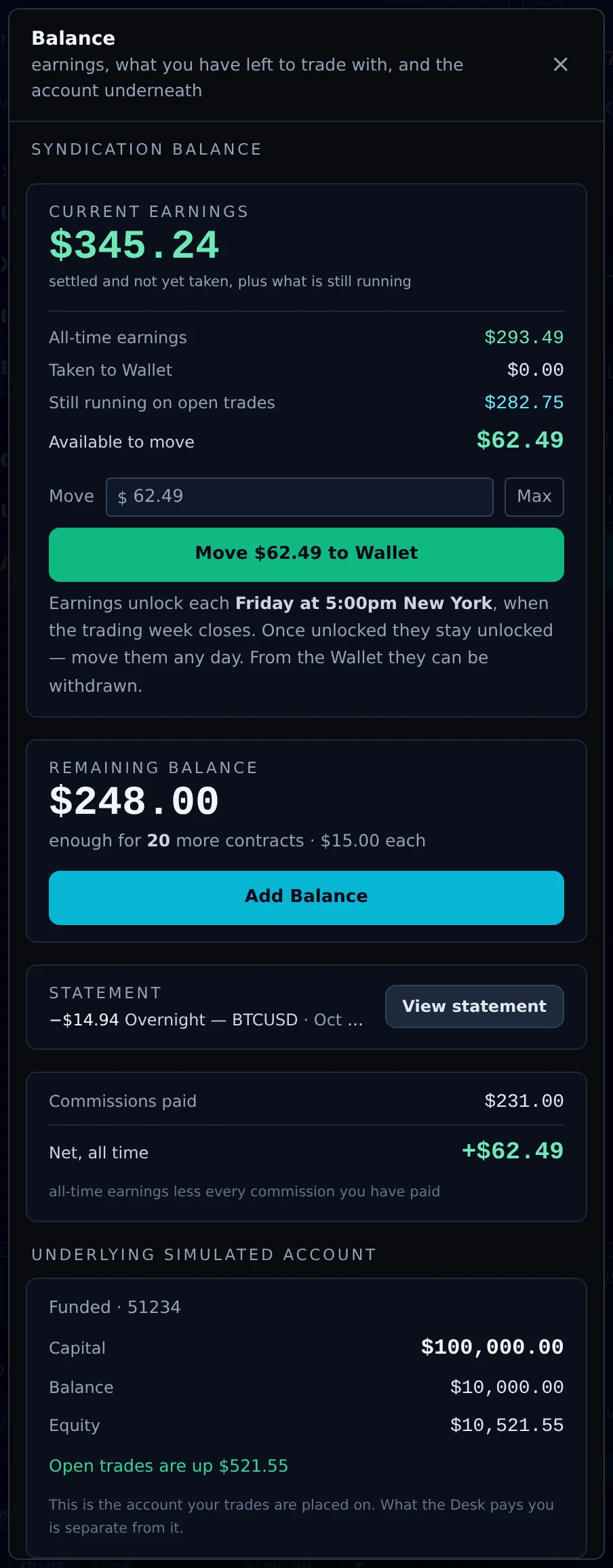
- Current earnings: settled earnings not yet taken, plus what is still running on open trades.
- All-time earnings, Taken to Wallet, Still running on open trades, and Available to move.
- Move to Wallet: enter an amount (or Max) and move it. Earnings unlock each Friday at 5:00pm New York, when the trading week closes. Once unlocked they stay unlocked, and you can move them any day. From the Wallet they can be withdrawn.
- Remaining balance: your syndication balance and how many more contracts it covers. Add Balance buys more.
- Statement: the latest entry, and View statement for the full list.
- Commissions paid and Net, all time (all-time earnings less every commission you have paid).
- Underlying simulated account: the account your trades are placed on, with its capital, balance and equity.
The statement
The statement lists every movement on your syndication balance: when, what, the symbol, contracts, amount and the balance after. Totals at the top show your balance and this month's fees, overnight charges and additions. Filter by Fees, Overnight or Top-ups.
| Entry | Meaning |
|---|---|
| Fee | The syndication fee for a trade. |
| Fee refunded | A fee returned, with the reason. |
| Top-up from Wallet / Contracts purchased | Balance you added. |
| Bonus Contracts (Reward Points) | Units added from reward points. |
| Overnight | An overnight charge. Wednesday nights are charged three times and marked 3×. |
| Overnight: not taken | A charge your balance could not cover. Rows in parentheses are still owed. |
Overnight charges
A syndicated position held through the daily rollover pays an overnight charge from your syndication balance. Wednesday counts as three nights. You can see the cost before you trade in the Watchlist, the instrument details and the ticket's Details.
"Overnight charge tonight: balance too low." If your balance will not cover tonight's charge, the Terminal warns you before the rollover with the amount, your balance and the shortfall, and how many minutes you have to top up or close a position. If nothing changes, positions can close, the Desk can step out of the trade ("Desk left: overnight carry unfunded"), or your balance can go negative.
Fees in one place
- Normal: $15 per contract. High-Risk: $25 per contract. The same on every instrument.
- Charged once, when the syndicated position opens. Pending orders: only when they fill.
- Not charged, or returned, when the Desk cannot join. The message says which.
- Not refunded because a trade did not make money: the fee pays for the Desk's allocation, whatever its result.